 Pace
Pace


Your friend on the pit wall. Their voice on your radio.
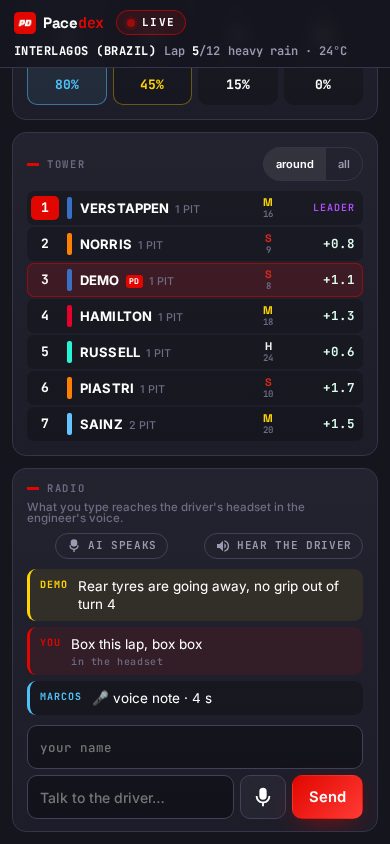
Open your pit wall and a friend sees your F1 25 car live, on any phone: gaps, tyres, fuel, weather, the tower. What they type on your team radio lands in your headset in your engineer's voice; hold the mic and it is their real voice. No VPN, no lobby slot, nothing to install on their side.
Live for as long as the session lasts — the room disappears when you close it.
Who needs what
The driver
Pacedex on the PC with the game, telemetry on. In Settings, Open pit wall gives you a link, a QR code and a WhatsApp button. Radio arrives in your headset; a second push-to-talk button lets you talk back to the wall.
The engineer
A friend, a coach, your dad, a teammate — anyone with the link. Phone, tablet or PC, any browser. Sees the car and the tower, types or holds the mic to talk. Can mute your virtual engineer and take over: AI muted · you're the engineer.
The league
Drivers in the same lobby who run Pacedex enrich each other's tower automatically — tyres, ERS, fuel of every car with the PD badge — and the commentator's booth can direct that room. Off with one switch in Settings.
What the wall shows
Position, the car ahead and behind with the gap and whether it is opening or closing, last and best lap, delta. The same numbers your dash shows, half a second later.
Wear and temperature per corner, ERS charge, fuel in laps, wing damage, brakes and the pit window your engineer already computes — so the human on the wall argues with data, not with guesses.
The cars around you or all of them, with tyre compound and age, pit stops and gaps. Drivers who also run Pacedex show the PD badge and full telemetry.
Cues built from your car's telemetry, like the ones the commentary booth gets: tyre near the cliff, wing damage, track drying. Your engineer sees the story before it happens.
Now, +5, +10, +15 minutes with the chance of rain — the number the game actually sends. When to switch to inters becomes a call two people can make.
Type and hit Send, or hold the mic. Each line is marked “in the headset” once it has been spoken. Turn on Hear the driver and their voice notes play on the wall too.
How the radio works
Settings → Open pit wall. Send the link, the QR or the WhatsApp message with the 8-letter code.
pacedex.com/pit/<code> on a phone, tablet or PC — no install, no account. Their name goes on every line they send.
Text is spoken into your headset in your engineer's voice with a radio effect. Hold the mic and it is their real voice, as a voice note. It plays even if you turned the virtual engineer off.
A second push-to-talk — key, wheel button or macro pad — “talk to the wall”: your speech is transcribed and read aloud there. Your questions to the AI engineer show up on the wall too.
Who it is for
One drives, the other watches the tyres from the sofa with a tablet and calls the pit stop. Same house or a different one — the wall doesn't care.
The lobby has 22 slots and your strategist doesn't need one. Your teammate who isn't racing this round sits on your wall and reads the gaps for you.
Hand the link to a mod: they watch your car and speak on your radio while you race, and everything they say reaches you in the engineer's voice, on stream.
The coach sees every lap, tyre and gap live and talks in your ear while you drive; afterwards, the conversation is in your Debrief on your own PC.
What leaves your PC — and what doesn't
The live state
The same fields your dash and the tower show — position, gaps, tyres, fuel, wings, weather — plus the tower of the 22 and the cues. Voice notes and the transcription of your push-to-talk (speech-to-text only — no AI assistant reads it, no login).
Your history
Your database, past sessions, setups and lap analysis stay on your PC. The room has no database and keeps no log of what passes through it; it expires 20 minutes after the last person leaves, 12 hours at most.
The conversation
The wall's radio lines are saved locally like your engineer's radio, so the Debrief can re-read them. The room itself keeps nothing.
Details in the privacy page.
The league kit
Pit Wall
A friend sees your car live on their phone and talks on your radio, into your headset.
Broadcast + Booth →
F1 TV–style overlay for OBS — animated tower, battles, pit stops, weather — and the commentator's booth that puts it on air.
Steward mode →
Every contact between two cars freezes 12 s of both drivers' steering, pedals, speed and position. Shareable incident link.
Frequently asked
Do I have to open the wall every session?
Yes — the wall is opt-in per session. Nothing leaves your PC until you click Open pit wall, and the room disappears when you close it or quit the app. Next race, one click again and send the link. Nothing is switched on behind your back.
Does my engineer need to join the lobby or install anything?
No. The pit wall is a web page: a phone, tablet or any browser is enough — no install, no account, no VPN and no lobby slot. Only the driver runs Pacedex, on the PC with the game.
Can I have the wall and the league booth at the same time?
One at a time in the app: close the pit wall to join a league booth room, and leave the booth to open your wall again. Pick per session — your own engineer on the wall, or the league room when the round is being broadcast. Either way, the radio is push-to-talk, not an open call: Discord for talking, the wall for seeing and calling the strategy.
Is anything recorded or stored on the internet?
No. The room lives in memory while it exists — no database, no log of what passes through it — and expires 20 minutes after the last person leaves, 12 hours at most. Nothing leaves your PC until you click Open pit wall, and only the live car state the dash already shows is sent — never your history. The radio conversation is saved only on your own PC, where the Debrief re-reads it.
Can several friends or the whole team watch at once? Can I watch a teammate?
Yes. Anyone you send the link to sees the same wall and can write on the radio with their name. To be a teammate's engineer, open the link they send you — or paste their code in Settings under Be another driver's engineer. The link is the key: share it only with the people who should see it.
Does it work with F1 24 and the F1 25 2026 Season Pack? PC only?
The driver runs Pacedex on a Windows PC with F1 24, F1 25 or the F1 25: 2026 Season Pack, with the game's UDP telemetry on. The engineer's side is any browser on any device. Both need internet: the wall goes through the room at pacedex.com.
Put someone on your pit wall next race
Free · Windows · no account. Live overlay, voice race engineer, corner-by-corner analysis and the pit wall for F1 24/25/26.
Download free · Windows →